Jupiter Studio Sniper Bot
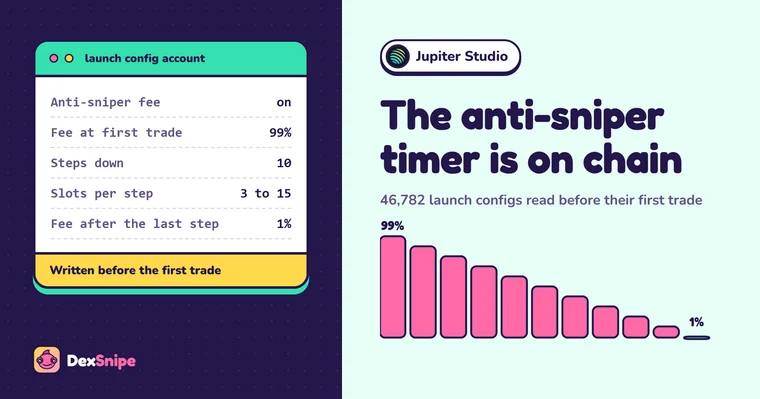
Jupiter Studio's documentation says that if a creator turns on anti-sniper protection, a higher fee applies in the first minutes after launch, and the creator keeps half of it. It does not say how high the fee starts or exactly when it ends, which makes it look like a lottery for anyone trying to time a buy. It is not. Every Studio launch gets its own config account on chain, and the timer is written into it before the first trade. We read 46,782 of them.
The short version
- The anti-sniper fee is a schedule, not a surprise. 99% at opening, down 9.8 points per period over 10 periods, with the period length fixed in the launch's config.
- Most launches have no timer at all. About two thirds charge a flat 1% or 2% from the first trade.
- Migration releases supply. On the most common setting, the creator's reserved tokens become claimable one second after the coin migrates.
- Most Studio coins are priced in USDC. A SOL-funded sniper swaps on the way in and out.
What a Jupiter Studio sniper bot does
Jupiter Studio is Jupiter's token launchpad. A Studio coin starts on a Meteora Dynamic Bonding Curve, where the price rises with every buy, and migrates to a Meteora DAMM v2 pool when the curve has raised its target. A sniper bot buys in the first moments of the curve, or the moment the migrated pool opens, and sells on rules you set.
What sets Studio apart from other launchpads on the same curve is how much each creator gets to choose. Quote asset, graduation target, anti-sniper fee, a reserved allocation of the supply and how it vests: all of it is set per launch. That makes Studio launches less uniform than Pump.fun or LetsBonk launches, and it makes reading each launch before buying more valuable.
One launch, one config
On most Meteora launchpads, thousands of coins share a handful of configs. Studio is different. Across its first fee claimer, 45,410 launches used 45,266 configs: almost every launch got its own. On its current fee claimer, it is exactly one config per launch.
A config is a public account that the bonding curve program reads on every trade. It holds the quote asset, the fee schedule, the migration target, how the migrated liquidity is split and locked, and the creator's reserved allocation with its vesting. Because Studio writes one per launch, the config is effectively the launch's rule sheet, published before anyone can trade.
Everything in this guide comes from those rule sheets, plus the state of each pool. Nothing here depends on screenshots, dashboards or what a launch page says about itself.
46,782 launches, read on chain
On November 6, 2026 we read every pool and config of the Meteora Dynamic Bonding Curve program and kept those whose fee claimer belongs to Studio. There are two. The first was used from June 4, 2025 to September 25, 2026. The second took over from September 11, 2026, and is the one in use now. Their token metadata is served from Jupiter's own Studio host.
Data table
Jupiter Studio launches by month, and share with the anti-sniper fee
| Month | Launches | Anti-sniper fee |
|---|---|---|
| June 2025 | 89 | 0% |
| July 2025 | 24,554 | 51% |
| August 2025 | 7,728 | 10% |
| September 2025 | 2,585 | 17% |
| October 2025 | 2,466 | 18% |
| November 2025 | 1,145 | 11% |
| December 2025 | 1,552 | 9% |
| January 2026 | 1,459 | 18% |
| February 2026 | 857 | 9% |
| March 2026 | 575 | 9% |
| April 2026 | 371 | 11% |
| May 2026 | 350 | 20% |
| June 2026 | 567 | 12% |
| July 2026 | 530 | 14% |
| August 2026 | 445 | 15% |
| September 2026 | 775 | 10% |
| October 2026 | 685 | 24% |
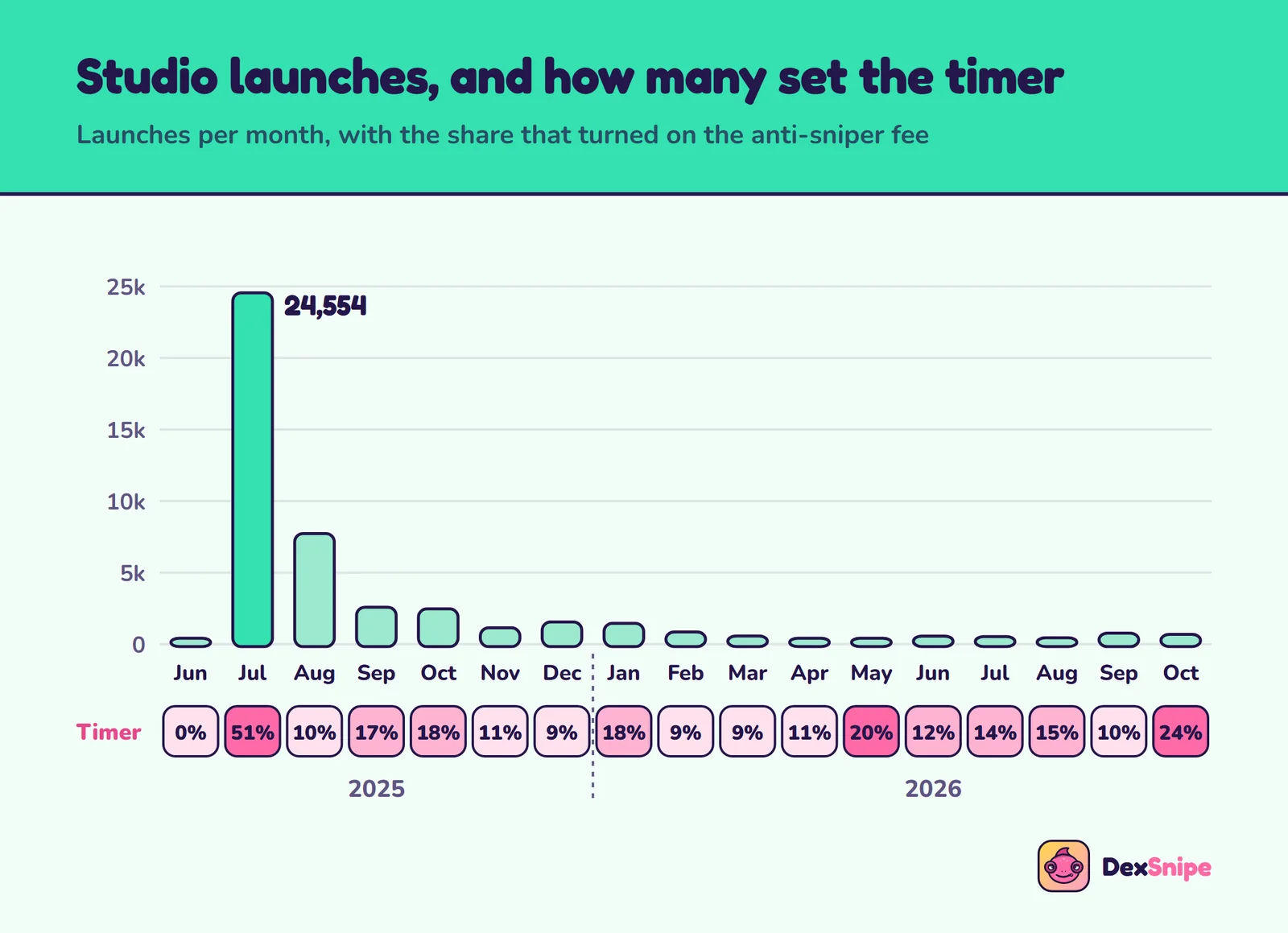
Studio opened with a burst. July 2025 alone saw 24,554 launches, more than half of everything since. Activity then settled into a steady few hundred to a couple of thousand a month. Unlike some launchpads we have covered, Studio is still launching: 685 coins in October 2026, every one of them on its current fee claimer, each from a different creator wallet.
The anti-sniper timer
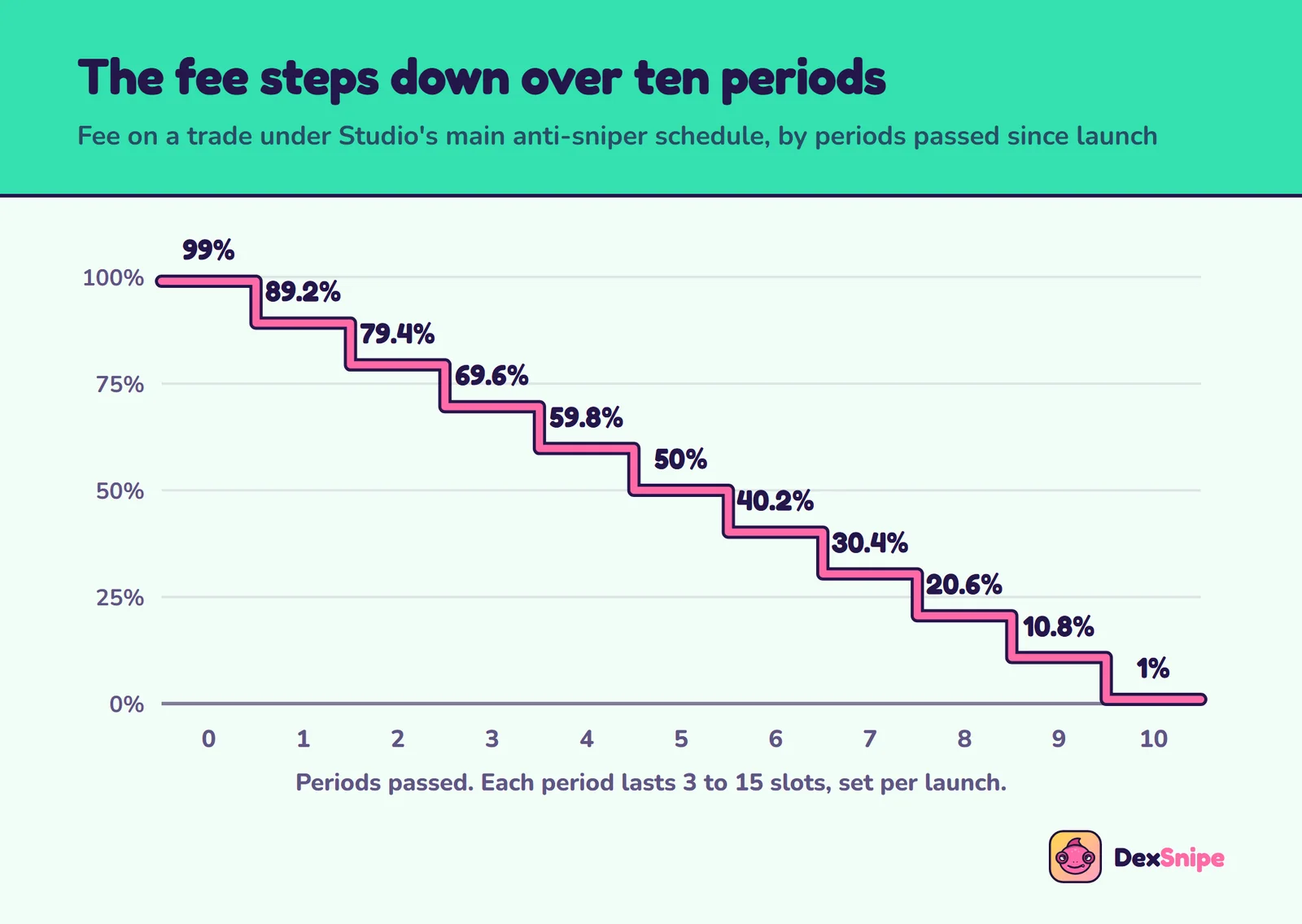
Meteora's bonding curve lets a launch set a fee schedule: a cliff fee at opening that falls each period, either linearly or exponentially. Studio's anti-sniper launches use a linear schedule. The most common one, on 13,430 launches, starts at 99% and falls by 9.8 percentage points every period for ten periods.
Data table
Studio's main anti-sniper schedule
| Periods passed | Fee on a trade |
|---|---|
| 0 | 99% |
| 1 | 89.2% |
| 2 | 79.4% |
| 3 | 69.6% |
| 4 | 59.8% |
| 5 | 50% |
| 6 | 40.2% |
| 7 | 30.4% |
| 8 | 20.6% |
| 9 | 10.8% |
| 10 | 1% |
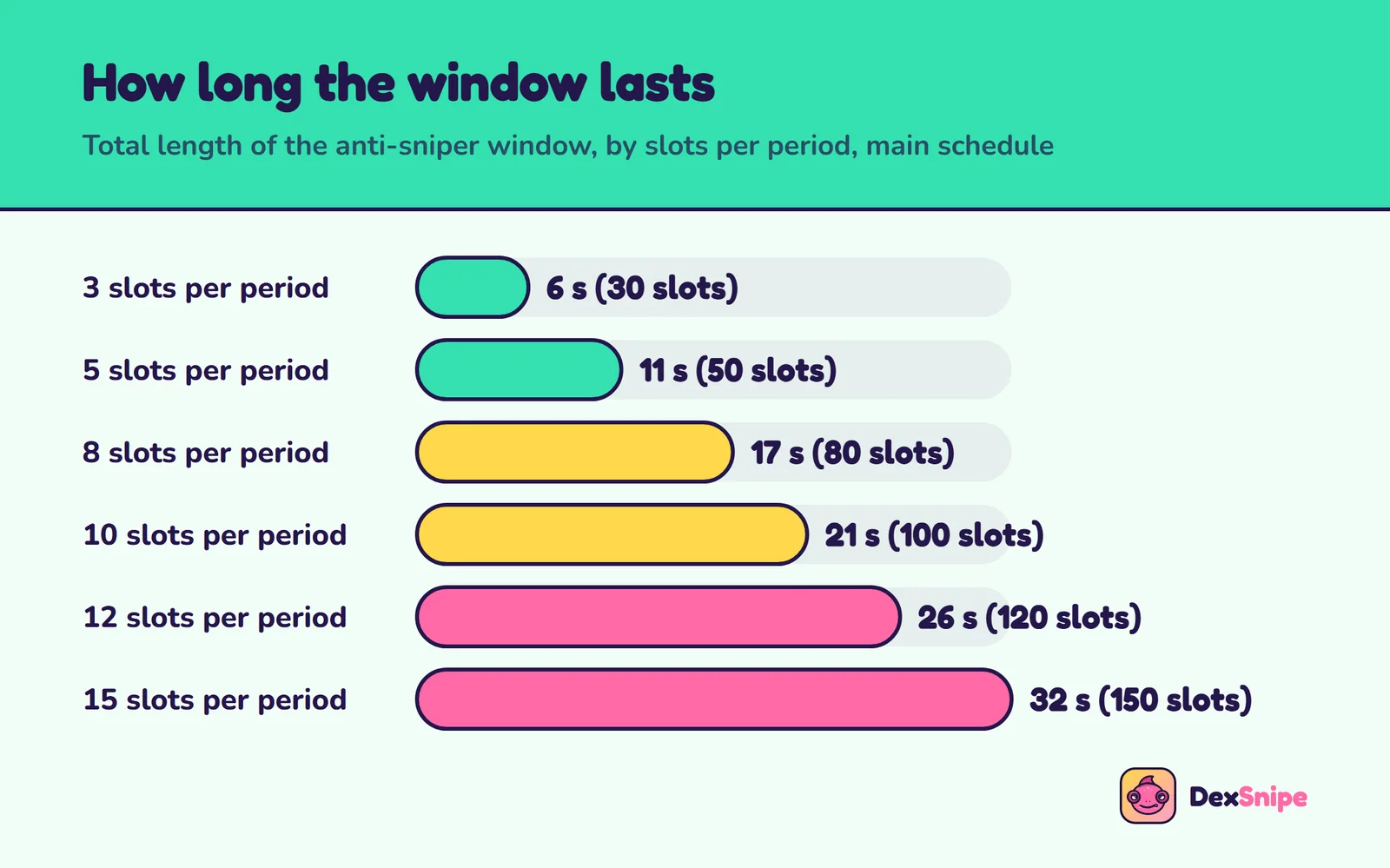
After ten periods the fee sits at 1%, Studio's ordinary trading fee. On this schedule, the only thing that changes from launch to launch is how long a period lasts. On these 13,430 launches it was between 3 and 15 slots, and the values from 4 to 14 were almost exactly equally common, about 1,150 launches each. That is what a random draw looks like.
Data table
Length of the anti-sniper window, main schedule
| Slots per period | Window | About |
|---|---|---|
| 3 | 30 slots | 6 seconds |
| 5 | 50 slots | 11 seconds |
| 8 | 80 slots | 17 seconds |
| 10 | 100 slots | 21 seconds |
| 12 | 120 slots | 26 seconds |
| 15 | 150 slots | 32 seconds |
Seconds use about 0.21 seconds per slot, Solana's pace since October 2026. Before that a slot took about 0.4 seconds, so on older launches the same windows ran about twice as long. Jupiter's docs describe the window only as the first minutes after launch. The configs are more precise, and the duration is not hidden.
A timed launch, second by second
Take a launch on the main schedule whose config sets 8 slots per period. Each period lasts about 1.7 seconds. A trade in the first 1.7 seconds pays 99%. Between about 1.7 and 3.4 seconds it pays 89.2%; by about 9 seconds, 50%; by about 15 seconds, 10.8%; and from about 17 seconds, 1%. A bot that reads the config knows all of this before the pool's first slot. A bot that does not is guessing, and the cost of a wrong guess in the first few seconds is most of the buy.
A second schedule, on 1,247 launches of the first fee claimer, uses six periods of 25 slots: 99% falling to about 1% over 150 slots, about 32 seconds. On the current fee claimer, 25-slot periods have become the norm. Of its 238 anti-sniper launches, 120 run six periods, about 32 seconds; 51 run thirty periods, under three minutes; 20 run 12 to 24 periods, one to two minutes. Only 47 still use the random ten-period timer. All of them are linear, and all of them are in the config.
Random, but not secret
A random timer protects a launch from bots that assume a fixed one. A bot that always buys at second 10 will sometimes land at 1% and sometimes at about 70%. But the randomness happens when the config is created, and the config exists before the pool opens. From that moment the timer is a fact on chain, not a roll of the dice.
This changes what being early means on Studio. On a flat-fee launchpad, the first slot is the cheapest place to buy, so speed is the edge. On a Studio anti-sniper launch, the first slot is the most expensive place to buy, and the cheapest is the slot right after the last period ends. Being early is still an edge, but early relative to the end of the timer, not the start of the pool.
What a first-slot buy costs. At 99%, a 1 SOL buy puts about 0.01 SOL to work. Every sell during the window pays the same scheduled fee. A bot that races into an anti-sniper launch, then hits a stop-loss ten seconds later, can pay most of its position in fees twice.
There is also a reason the fee exists beyond protection. Jupiter's docs say the creator receives half of the anti-sniper fee. Every SOL a sniper pays in the window is, in part, income for the creator. That is fine as long as you know it is there, and the config tells you exactly how much there is.
Most launches have no timer
Anti-sniping is a choice, and most creators do not make it. Studio's Meme preset, the quick default, has it switched off; only Custom mode turns it on. On Studio's first fee claimer, 24,860 launches charged a flat 1% from the first trade and 5,254 a flat 2%. Only 15,250, about a third, used an anti-sniper schedule. In July 2025, the busiest month, it was about half; through 2026 it has ranged from about one launch in ten to one in four.
On its current fee claimer the picture is the same: 651 launches at a flat 1%, 465 at 2%, a handful at 3%, and 238 with an anti-sniper schedule, about one in six.
So a Studio sniper really faces two different venues under one name. On the two thirds of launches without a timer, Studio behaves like any flat-fee launchpad, and the first slots are the cheapest. On the third with a timer, the first slots are the most expensive. A sniper that treats them the same will be badly wrong on one launch in three.
USDC, JUP and SOL
Studio coins are not always priced in SOL. On the first fee claimer, 38,701 launches, 85%, were paired with USDC, 6,512 with SOL and 197 with JUP. Studio's Meme preset uses USDC, and its documented target of about 15,390 USDC raised before graduation shows up in the configs of 6,113 launches.
The current fee claimer is more mixed: 587 USDC launches, 436 JUP launches, 338 SOL launches, and 11 paired with tokenized stocks.
The JUP share is new. On the first fee claimer, JUP-paired launches were well under 1%; on the current one they are close to a third. A JUP-paired coin moves with JUP as well as with its own demand, so a sniper buying it is also, briefly, taking a position in JUP.
For a sniper funded in SOL, a USDC or JUP launch means a swap before the buy and another after the sell, each with its own fee and slippage, and a position whose value moves with the quote asset as well as with the coin. None of that is a problem if you plan for it. It is a problem if your targets assume SOL in and SOL out.
After graduation
When a Studio curve completes, the coin moves to a Meteora DAMM v2 pool. Jupiter's docs set the minimum raise at 15,000 USDC or the equivalent in SOL or JUP, and the config fixes the exact target per launch.
Two settings in the config decide what a migration sniper is buying into. The first is the liquidity split. On Studio's current fee claimer, every launch sets all of the migrated liquidity to be locked permanently, almost always half for Jupiter and half for the creator. Nobody can pull the pool out from under you, which removes the most common way a fresh pool collapses elsewhere on Solana.
The second is the creator allocation, covered next. Liquidity that cannot leave and supply that can arrive at once are the two facts that shape a Studio migration, and both are in the config before the pool opens.
Who launches on Studio
29,894 different wallets launched on Studio's first fee claimer. 27,210 of them launched exactly once. 320 launched ten or more coins, 10,632 launches between them, and the busiest single wallet launched 619. On the current fee claimer every one of the 1,372 launches so far came from a different wallet.
That makes Studio more of a one-coin-per-creator venue than most launchpads. It also means creator history is thin: most Studio creators have no previous launch to judge them by. Where one does exist, it is worth reading, and a Creator watch sniper is the way to act on it. Where it does not, the config and the usual holder filters have to carry more of the load, because there is no track record to lean on.
The creator allocation
Studio lets a creator reserve part of the supply for themselves. The tokens do not exist on the curve; they are set aside and released after the coin migrates, through a vesting escrow created in the migration transaction itself. Jupiter's docs describe it as creator vesting, available in Custom mode for up to 80% of the supply, on a schedule that starts at graduation.
On Studio's first fee claimer, 33,365 of 45,410 launches, 73%, reserved an allocation. The vesting settings fall into three groups:
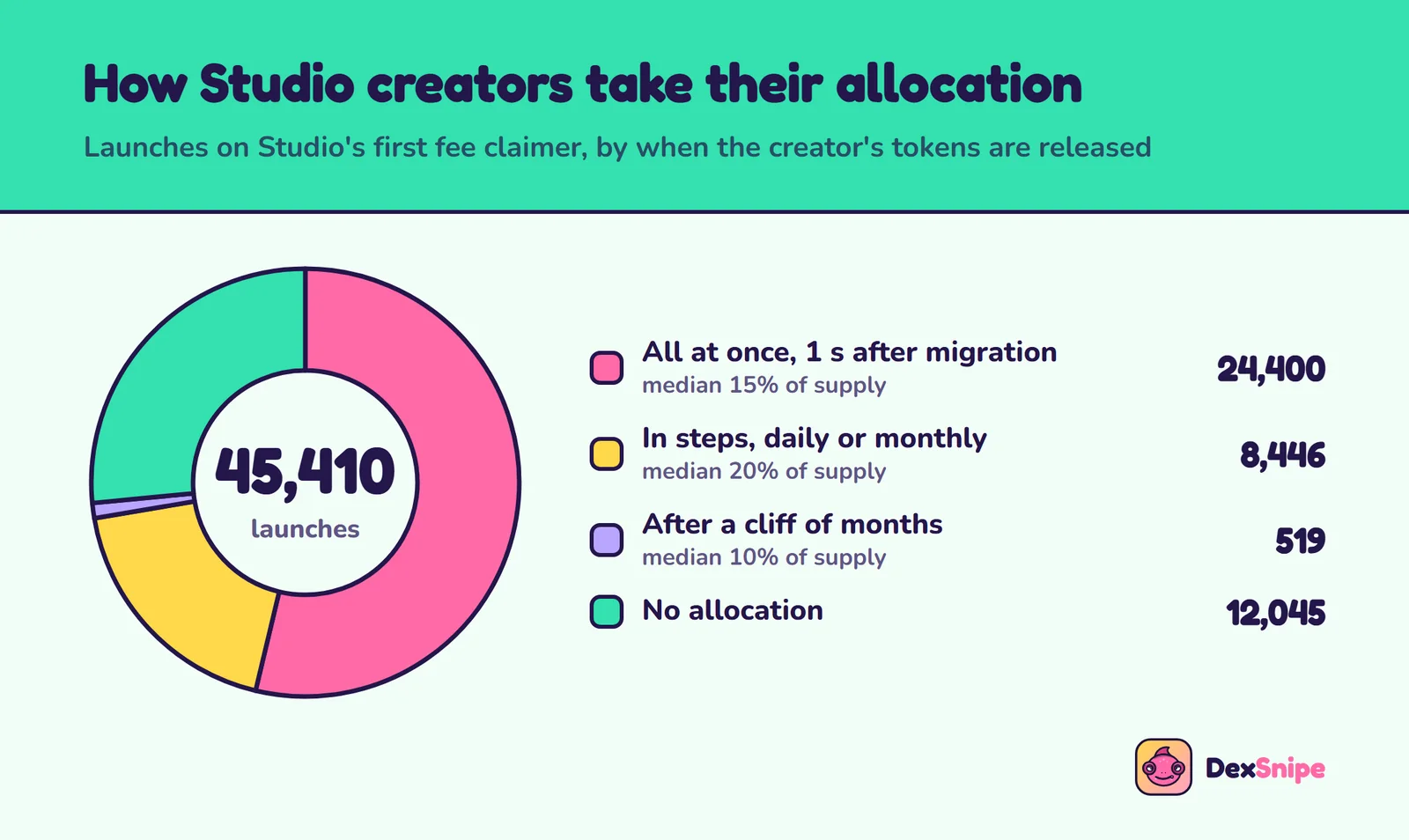
Data table
Creator allocations on Studio's first fee claimer
| Release after migration | Launches | Median share of supply |
|---|---|---|
| All at once, one second after migration | 24,400 | 15% |
| In steps, daily or monthly | 8,446 | 20% |
| After a cliff of months | 519 | 10% |
| No allocation | 12,045 |
The first row is the one that matters to a migration sniper. Its schedule has a single period of one second and no cliff: the moment the coin migrates, the whole allocation is claimable. On those launches a quarter reserved 25% of the supply or more, and 1,521 reserved half or more.
Among the 1,050 launches on the first fee claimer that completed their curves, 707 had an allocation released this way. In other words, on two thirds of migrated Studio coins, a block of supply became the creator's to claim at the same moment migration snipers were buying.
On the current fee claimer, allocations are less common, 406 of 1,372 launches, and the typical one is smaller. But the release setting is the same: 275 of the 406 release everything one second after migration.
One allocation, claimed in full
Catalytics was launched on Studio on July 3, 2025 at 05:27, with a supply of 100 million tokens and a 20% creator allocation on the release-at-once setting.
- 05:27. The pool opens on the bonding curve.
- 07:00, about 90 minutes later. The curve completes. In one transaction, the coin migrates to its DAMM v2 pool and a vesting escrow is created holding 20,000,000 tokens, 20% of the supply.
- July 10, 2025. The creator claims all 20,000,000 tokens from the escrow in a single transaction.
There is nothing hidden here. The allocation was in the config from the first second, the escrow appeared in the migration transaction, and the claim is a public record. This creator waited a week. The config allowed them to claim the same second the pool opened, and anyone sniping the migration was buying into a market where a fifth of the supply could arrive at any moment.
Mints that only look like Studio
Most Studio mints end in the letters jups: 33,555 of 45,410 on the first fee claimer. It is tempting to use that as a filter. It is not reliable.
When we read the base mint of every Dynamic Bonding Curve pool, 2,393 mints ending in jups were outside Studio's first fee claimer. 345 belonged to Studio's current one. The other 2,048 were spread across other fee claimers, several with hundreds of such pools each, nearly all of which had already migrated. A vanity suffix costs nothing to grind. The fee claimer in the config is the reliable test of whether a launch is really Studio's.
Five mistakes Studio snipers make
- Racing the first slot on a timed launch. The first slot is the most expensive one. Paying a big tip to get there pays twice for the privilege of losing most of the buy to the fee.
- Assuming every Studio launch is timed. Two thirds are not. Treating a flat-fee launch as if it were timed means waiting while faster bots buy the cheapest slots.
- Guessing the window. A fixed delay of, say, 15 seconds lands inside the fee window on launches with long periods and wastes time on launches with short ones. The window is in the config; read it.
- Selling inside the window. A stop-loss or a short timer that fires while the fee is still high pays the scheduled fee on the way out. On a timed launch, exits should wait for the window to close.
- Ignoring the allocation at migration. On two thirds of migrated Studio coins, the creator could claim a reserved block of supply the moment the pool opened. Buying the migration without checking how much is like buying a stock without knowing how many shares are about to be issued.
None of these is a reason to avoid Studio. Each is a reason to read the config before the sniper fires. Studio publishes more about each launch than most launchpads do; the snipers that do well on it are the ones that use what is published.
Reading a Studio launch
Everything that matters can be read from the pool and its config, in the time between the pool appearing and the first trade worth making:
- Is it really Studio? Check the config's fee claimer, not the mint suffix.
- Is there a timer? A cliff fee of 99% means yes. Read the number of periods and the slots per period, and add the window to the opening slot. That is the slot the fee reaches its floor.
- What is the quote? USDC, JUP, SOL or something else. Size and targets follow from it.
- Is there an allocation? Read the locked vesting settings: how much, and whether it releases all at once after migration.
- How much does the curve need? The migration target tells you how far the coin has to go before the allocation, if any, comes due.
Meteora's SDK decodes all of these fields. A sniper bot can apply them automatically; a person can check them on an explorer in a few minutes for a creator they are planning to follow.
What this data does not tell you
- Configs are rules, not outcomes. We read what each launch was set to do. What individual buyers paid depends on when their trades landed.
- Months are approximate at the edges. Pools record slots; we converted them with block times read across the period.
- Two fee claimers, maybe not all. If Studio launched under a third fee claimer we did not find, those launches are missing. Our scan of jups mints found only the two.
- Claimable is not sold. An allocation released at migration may be claimed late or never sold. The example creator waited a week. The point is what the config allows.
- We did not measure returns. This guide is about what each launch was set up to do. Whether buying after the timer, or skipping big allocations, made money over time is a separate question that needs trade-by-trade data.
- Settings can change. Studio has already moved to a new fee claimer and shifted its anti-sniper schedules toward longer, fixed windows. What is common today may not be next quarter.
- Seconds are approximate. We used about 0.21 seconds a slot, the pace we measured in November 2026. Until September 2026 a slot took about 0.4 seconds, and real slot times vary a little.
Filters for Studio launches
- Treat timed and untimed launches as separate venues. On a flat-fee launch, speed pays. On a timed one, it costs up to 99%.
- Dev holding cap. A creator buy at launch is a position that can be sold into you. Keep the cap at 5 to 10%.
- Top 10 holder cap. Catches positions spread across wallets.
- Skip bundled launches. Wallets buying in the creator's own block are often the creator's.
- Socials. Studio launches can carry social links. A launch without any is a launch nobody is standing behind publicly.
- Mind the allocation on migrations. A large allocation released at migration is supply waiting to arrive. Size migration buys with that in mind.
Jupiter Studio sniper settings
Starting points, not promises. The two columns are the two kinds of Studio launch.
| Setting | Flat-fee launches | Anti-sniper launches |
|---|---|---|
| Trigger | Fresh launch | Skip the launch, snipe the migration |
| Buy size | 0.05 to 0.15 SOL | 0.1 to 0.25 SOL |
| Slippage cap | 15 to 20% | 10 to 15% |
| Priority fee | 0.001 SOL | 0.0005 SOL |
| Jito tip | 0.002 SOL | 0.001 SOL |
| Dev holding cap | 5% | 10% |
| Skip bundled launches | On | On |
| Top 10 holder cap | 25% | 35% |
| Take-profit | +30% sell 50%, +80% sell 50% | +40% sell 50%, +120% sell 50% |
| Stop-loss | 25% | 30% |
| Timer exit | 15 minutes | 30 minutes |
| Dev-sell exit | On | On |
Why the tip goes down on anti-sniper launches
Paying for priority buys you the first slot. On a timed launch the first slot costs 99%. The slot you want is a known one, written in the config, and you do not need a big tip to land near it. Save aggressive tips for the flat-fee launches, where the first slot really is the cheapest.
Slippage and fees are different things
A slippage cap guards against the price moving between quote and fill. Whether it also guards against the fee depends on how the bot builds its quote. Do not rely on it to keep you out of a 99% window; read the config before you arm a sniper on a launch.
Take profit, stop loss and selling
The curve does not hold orders, so every exit is the bot watching the price and sending a sell. DexSnipe gives each sniper up to four take-profit steps, a stop-loss, a trailing stop, a timer and a dev-sell exit, all running on the server after you close the tab.
- Do not sell inside the window. Sells pay the scheduled fee too. A stop-loss or timer that fires in the first minute of a timed launch can pay up to 99% on the way out.
- Count the quote swap. On a USDC or JUP launch, your exit includes a swap back to SOL.
- Watch migration closely. On launches with an allocation released at migration, a trailing stop protects a migration buy better than a fixed target.
- Keep the dev-sell exit on for creators who sell after the launch window.
| What you see | Likely cause | What to change |
|---|---|---|
| Buy fills at a tiny fraction of its value | Bought inside the anti-sniper window | Wait for the timer on timed launches |
| Small wins vanish on exit | Quote swap plus fees | Widen the first take-profit |
| Price drops days after migration | Creator allocation claimed and sold | Use a trailing stop on migrations |
| Sniper buys coins from other deployers | Filtering by mint suffix | Filter by Studio's fee claimer |
Choosing a Jupiter Studio sniper bot
- Does it read the curve's fee schedule before buying? On Studio, that is the difference between paying 1% and 99%.
- Does it handle quote assets other than SOL? Most Studio launches are priced in USDC.
- Can it follow chosen wallets, so you buy creators with a record instead of every launch?
- Does it check holdings before the buy, with a dev cap, a top 10 cap and a bundle check?
- Is the price flat? A per-trade cut on top of Studio's own fee adds up quickly on small positions.
Jupiter Studio in DexSnipe
Jupiter Studio is a venue for the Fresh launch, Migration, Creator watch and Copy trade triggers. Every sniper has a dev holding cap, a top 10 holder cap, a bundled launch check, a socials check, mint and freeze authority checks and a word blocklist, and up to four take-profit steps with a stop-loss, trailing stop, timer and dev-sell exit. The price is a flat plan from 1 SOL for 7 days with no cut of your trades. For how launch fees work across every launchpad on Meteora's curve, see the Meteora guide.
Set up a Jupiter Studio sniper in DexSnipe
- Open the panel and click New sniper. Choose Creator watch, Fresh launch or Migration, and tick Jupiter Studio.
- Set the buy: size, slippage cap, a modest priority fee and tip.
- Set the filters: dev holding cap, skip bundled launches, top 10 holder cap.
- Build exits that respect the window: two take-profit steps, a stop-loss, a timer that ends well after the fee window and dev-sell on.
- Connect your wallet and save. Snipers are stored on your wallet address.
- Pick a plan, add a sniper wallet and arm it. Send 1, 3 or 5 SOL to the reserved address, add the key of a separate funded wallet, arm the sniper and close the tab.
Trade only what you can lose. Most new coins on any launchpad lose value. Reading a launch's config improves your choices; it does not make new coins safe. This page is not financial advice.
Jupiter Studio sniper bot questions
What is a Jupiter Studio sniper bot?
+
A bot that buys new Jupiter Studio coins in the first moments on their Meteora bonding curve, or when they migrate to a Meteora DAMM v2 pool, and sells on rules you set. It can also follow chosen creator wallets and buy their next launch.
How long does Jupiter Studio's anti-sniper fee last?
+
It varies per launch. On the most common schedule, the fee starts at 99% and drops by 9.8 percentage points every period for 10 periods, down to 1%. The period length is set per launch between 3 and 15 slots, so the whole window lasts from about 6 to about 32 seconds.
Can a sniper know when the Studio anti-sniper fee ends?
+
Yes. The schedule is written into the launch's own config account before the first trade: the cliff fee, the number of periods, the period length in slots and the reduction per period. Reading it tells you the exact slot the fee reaches its floor.
Do all Jupiter Studio launches have the anti-sniper fee?
+
No. Across 46,782 launches, about a third used it. It was on for about half of launches in July 2025 and for between one in ten and one in four through 2026. The rest charge a flat 1% or 2% from the first trade.
What is the creator allocation on Jupiter Studio?
+
Studio lets creators reserve part of the supply for themselves, released after the coin migrates. 73% of launches on Studio's main fee claimer reserved some. On the most common setting, the whole allocation could be claimed one second after migration, and the median allocation on that setting was 15% of supply.
Which quote asset do Jupiter Studio coins use?
+
Mostly USDC. 85% of launches on Studio's first fee claimer were priced in USDC. On its current one, since September 2026, USDC is still the largest group, followed by JUP and then SOL, with a few launches paired with tokenized stocks.
Who receives the Jupiter Studio anti-sniper fee?
+
According to Jupiter's docs, the creator receives half of the higher fee charged right after launch when anti-sniper protection is on, the same half they receive of Studio's ordinary 1% or 2% trading fee.
Does Jupiter Studio's Meme preset have anti-sniper protection?
+
No. Jupiter's docs list the Meme preset with anti-sniping off and no creator vesting. Anti-sniper protection and creator allocations come from Custom mode, which is why most Studio launches have no timer.
Does DexSnipe take a fee on Jupiter Studio trades?
+
No. DexSnipe is a flat plan: 1 SOL for 7 days, 3 SOL for 30 days or 5 SOL for 90 days. You pay the network fee, your priority fee and tip, and the coin's own trading fee.
Sources and method
On November 6, 2026 we listed every pool config and every pool of the Meteora Dynamic Bonding Curve program. We identified Studio's two fee claimers from token metadata served by Jupiter's Studio host, kept the configs naming them, and read every pool created with those configs: its config, creator, base mint, opening slot and migration flag. From each config we decoded the quote mint, fee schedule, migration target, liquidity split and locked vesting settings with the program's IDL. Opening slots were converted to dates using block times read across the period.
To find Studio launches under other fee claimers, we read the base mint of every Dynamic Bonding Curve pool and checked those ending in jups. For the example coin we read its creation, migration and escrow transactions directly. Fee percentages are computed from each config with the linear formula in Meteora's documentation. DexSnipe triggers, filters and exits are taken from the product itself.
- Jupiter docs: StudioStudio's modes, the 1% or 2% trading fee, the creator's half of the anti-sniper fee and creator vesting of up to 80% of supply.
- Jupiter docs: Launching a token on StudioThe Meme preset (USDC, about 15,390 USDC raised before graduation, anti-sniping off) and Custom mode settings.
- Meteora docs: DBC fee schedulerThe linear and exponential fee schedules and the parameters we decoded.
- Meteora Dynamic Bonding Curve program on SolscanThe program whose pools and configs we read.
- Studio's first fee claimer on Solscan45,410 launches, June 4, 2025 to September 25, 2026.
- Studio's current fee claimer on Solscan1,372 launches from September 11, 2026 to November 6, 2026.
- The example coin, Catalytics, on SolscanLaunched July 3, 2025 with a 20% creator allocation.
- Its migration transaction, on SolscanCreates the vesting escrow and moves 20,000,000 tokens into it in the same transaction as the migration.
- The creator's claim, on SolscanJuly 10, 2025: all 20,000,000 tokens claimed from the escrow in one transaction.
Read the launch, then snipe it
Build your snipers for free, then a plan from 1 SOL switches them on. No cut of your trades.